Unstuck
A mobile app that helps skilled workers who no longer want their jobs see which parts can still change.
Try the App
Year
2026
Platform
Mobile
Role
UX Designer

The Problem
Many stay for years because they can't tell if the job will ever improve.
By the end of the workday, they're too drained to figure it out.
Skilled but Unhappy
Most people I surveyed had been good at a job they no longer wanted and most of them stayed a year or more.
Worn Out by Work
Half said work often leaves them worn out.
Advice That Skips the Present
Most career tools focus on the next job, not the one people have now.
The Solution

Talk Through Your Week
Each session starts with one question about last week's work. Users can talk or type.

Rate the Effort
Unstuck turns the answer into a list of responsibilities. Users rate how much effort each one takes.

Find the Biggest Gap
Results show the work that takes the most effort but matters least to the company. That's the place to start.

Turn Results Into Steps
Users plan small steps to make that work easier. AI suggests ideas if they need help.
Background
I handled the research, design, and testing for Unstuck on my own. I also built a working version so testers could try it with real situations from their jobs.
My first idea was to suggest new jobs based on each user's strengths. Research showed workers first needed to know if their current job could still improve.
"Just because you're good at something doesn't mean you enjoy it."
Interview participant
Research
I compared 5 career tools, interviewed 5 people, and ran a survey with 26 responses.
Competitive Analysis



•
What They Do Well: Teal organizes a job search. CareerExplorer matches careers through a quiz. Claude answers almost any work question.
•
What They Miss: Teal assumes you know the job you want. CareerExplorer asks over 100 questions. Claude stays broad unless you know what to ask.
•
Where Unstuck Fits: It asks very little and starts with the job users already have.
User Interviews and Survey
•
Who I Talked To: 5 people at different career stages. I asked about real moments when they felt stuck.
•
What Stood Out: Talking about work quickly turned emotional. Many wanted to vent, which showed me where the app could help.
•
How I Checked It: A 5 minute survey tested the patterns with a larger group. I sorted every answer into an affinity map.
What I Found

•
Good at It, Done With It: 20 of 26 had been good at a job they no longer wanted. 18 of them stayed a year or more.
•
Too Drained to Change: 13 of 26 said work often leaves them worn out. "When I had a job I was too tired to search."
•
Strengths Only Count When You Find Them: 22 of 26 had been told about a strength they never noticed. Only 4 believed it right away. Most found their strengths through the work itself.
•
No Clear Way Out: The top reasons for staying were not knowing what else to do, money, and being too tired to start.
Define
I made empathy maps from my interviews, then 3 personas based on why people stay stuck. Marcus has never looked beyond his company. Andre is too worn out to start. Nicole knows where she'd go, but her boss stands in the way.
Empathy Maps

User Personas


How Might We…
Ideation
Research showed people only trusted strengths they found on their own, so job suggestions built on strengths wouldn't mean much. I shifted to the parts of work that drain them and set 3 design goals:
✓
People can't tell if their job can be fixed, so the app shows which parts can still change
✓
They're too drained to act, so the first step has to feel small
✓
Their manager may be the problem, so the app works without one
My next version split work into 7 parts, like pay and growth. It was too big for this project. Interviews also showed real moments drew better answers than big-picture questions. So I built each session around one recent work week:
•
Must-Have: A guided look at one week, a list of responsibilities, effort ratings, results, and a plan of small steps.
•
Nice to Have: Progress tracking, picking up where the last session left off, and step reminders.
•
Surprising and Delightful: Comparing sessions over time and custom groups for responsibilities.
•
Can Come Later: A map of who helps, drains, or blocks the work.
Shaded screens in the sitemap are in this first version. The rest show where the app could grow.

One user flow follows a first session. The other follows a returning user checking their plan or progress.

Low fidelity wireframes let me settle the screen order and what each one asks before adding color.

Design
Users may open Unstuck after a long workday, so every step asks for as little as possible:
•
Talk or Type: Users answer out loud or type, whichever is easier.
•
AI Builds the List: AI turns the answer into responsibilities in the user's own words. It asks follow-up questions if the answer is too short, and users can fix anything.
•
Rate It, Then Rank It: Users rate the effort each responsibility takes. Then they rank them by how much the company depends on each one.
•
AI Suggests, Users Decide: AI offers next step ideas for each responsibility. It never tells anyone what to do with their career.

•
Built on 4 Values: Calm, honest, hopeful, and actionable. Users may already be drained, so it had to feel easy on the eyes.
•
A Softer Navy: My first palette felt too heavy, so I lightened the navy. I also fixed every color that failed accessibility checks.
•
One Warm Accent: Orange marks actions. A soft blue helps users compare information.
•
A Split Wordmark: A line splits "un" and "stuck." It stands for what keeps someone stuck, and the app helps remove it.

Testing & Iterations
I tested the working app over video in 2 rounds. In round 1, 3 testers used it on their own phones. In round 2, they came back and 2 new testers joined. Each tester talked through their week, checked their list of responsibilities, rated each one, and planned a next step.
•
Feedback: Round 1 testers read "energy" as something work gives them. Time with their team almost scored as high energy.
•
Final Iteration: I renamed it effort and defined each level by time and focus. All 5 round 2 testers understood it.
•
Feedback: Some questions ask users to pick a responsibility they already named. 2 of 5 round 2 testers missed the list of their earlier answers below the box.
•
Final Iteration: Helper text under the question now points users to their answers. I also removed a fade effect that hid the last answer.
Tested Version

Updated Version

•
Feedback: Some responsibilities can't change right now. Testers said they'd write steps like "Nothing can be done," which could never be checked off.
•
Final Iteration: A "Can't change right now" option puts it on hold, so it no longer sits unfinished on their to-do list.
Tested Version
Updated Version

•
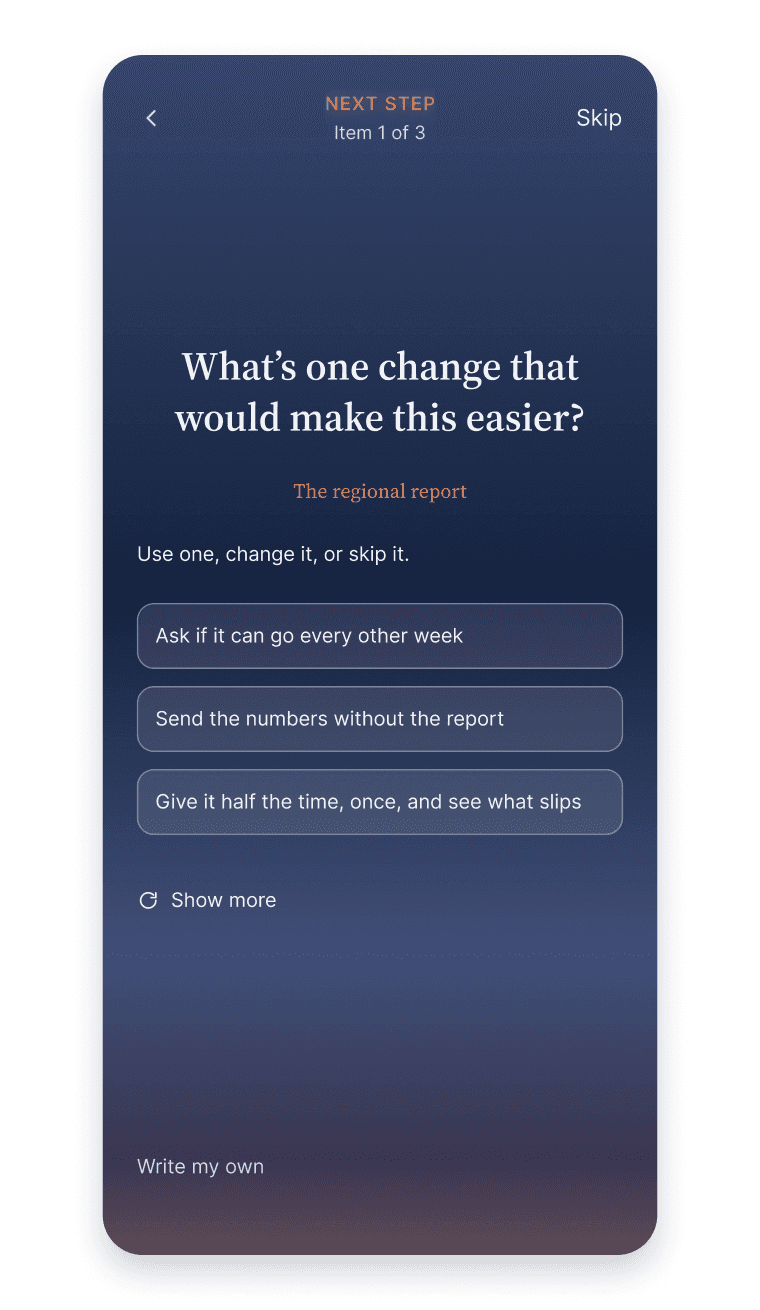
Feedback: One tester liked several AI suggestions, but Unstuck only let them pick one.
•
Final Iteration: Users can now pick as many as they like. Each becomes its own step, and "Show more" brings up others.
Tested Version

Updated Version

•
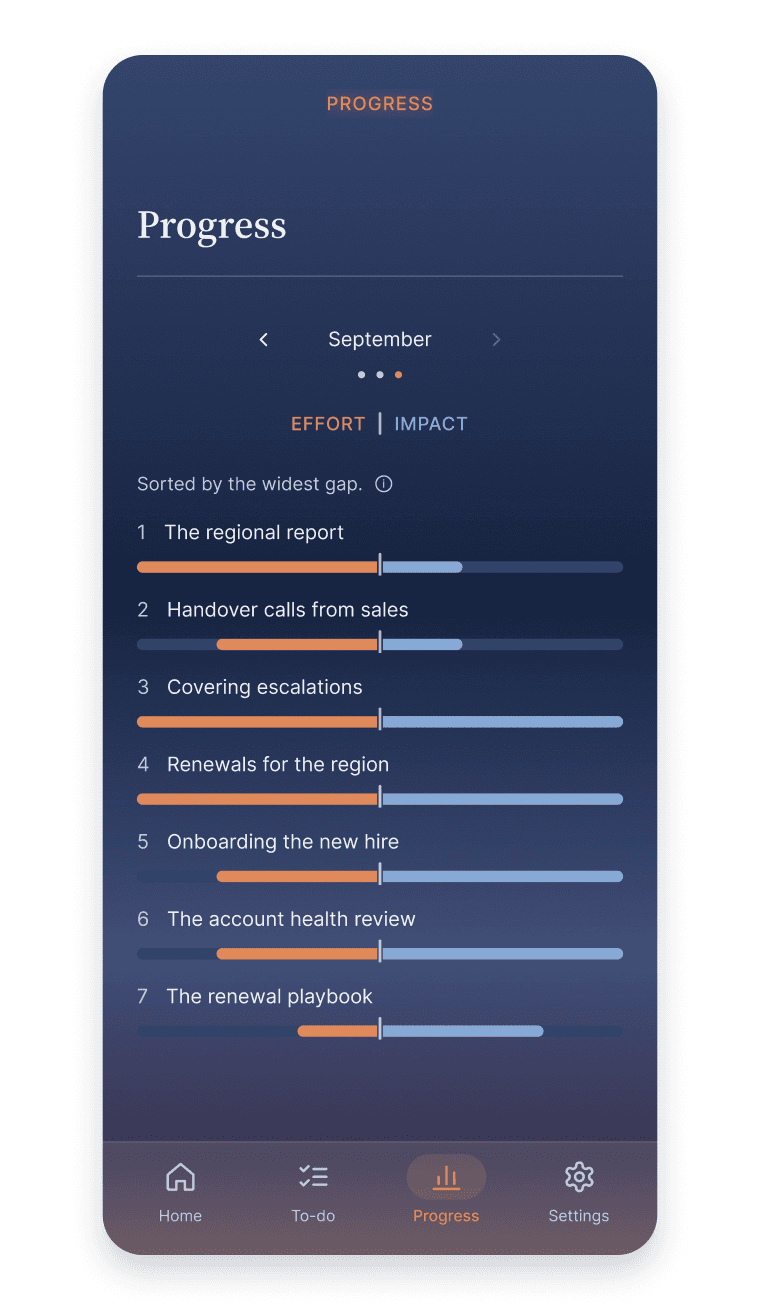
Feedback: Testers wanted to know if their work was becoming easier.
•
Final Iteration: Home now shows change from last month. A new Progress screen tracks effort and impact over time, which gives users a reason to come back.
Tested Version

New Progress Screen
•
Feedback: 2 testers weren't sure how to explain their results to a manager.
•
Final Iteration: A Common Questions section answers questions like "Where do these numbers come from?"
Tested Version

Updated Version

Results
Success meant testers could find the part of their job worth changing and explain it in their own words. The results screen drew the strongest reaction in every session.
•
Round 1: All 3 testers found the work that took the most effort but mattered least. 2 said something about their week they hadn't said out loud before.
•
Round 2: The top request in round 1 was to explain the results screen. After I added an explanation, round 2 testers understood their results quickly. Most feedback was about what comes next, like putting work on hold or seeing progress.
Final Prototype

Final Thoughts
Many people I interviewed got emotional talking about their jobs. One called me in tears because she felt stuck. That showed me where Unstuck could help most. My biggest lesson was how much depends on asking the right questions. Once a conversation goes deeper, people share things that spark new ideas.
Next Steps
•
Test the Latest Changes: None of the changes from round 2 have been tested yet.
•
Track Real Progress: Test the Progress screen after a month of real use.
•
Show Where Answers Came From: Let users see which part of their answer each responsibility came from.
What I'm Most Proud Of: Unstuck started as an idea with no clear direction. Once interviews reached that emotional level, each round of research and testing led to the next idea. The users shaped the app. Building a working version also led to more honest reactions in testing. Even if someone only uses Unstuck to vent, that still matters. Sometimes the first step is simply saying it out loud.