Day One
A guided enrollment feature that helps first-time enrollees understand their options and choose a health plan with confidence.
View Prototype
Year
2026
Platform
Mobile
Role
UX Designer

The Problem
Open enrollment uses terms like deductible and premium without explaining them.
Many people choose a plan and hope for the best.
Confusing Insurance Terms
Insurance terms like deductible and out-of-pocket max are never explained, so people guess what they mean.
Left to Figure It Out
The enrollment website lists plans and prices but doesn't help people choose one. Most turn to a parent, partner, or coworker.
Hidden Charges
Some people missed a default setting during enrollment and only found out when an extra charge showed up on their first paycheck.
The Solution

Jargon Decoded
Underlined words open a simple definition with a real example.

Your Best Fit Explained
A few simple questions lead to a suggested plan and the reason behind it.

Hidden Perks Uncovered
Day One points out benefits people already pay for but rarely use, like free checkups and chiropractic care.

Payday Without Surprises
Before submitting, Day One flags anything that adds a charge, like a tobacco surcharge.
Background
In the US, most people pick health insurance through work during a short window called open enrollment. Terms like deductible and premium show up with no explanation. Many feel embarrassed to ask, so they guess.
Day One is a concept feature I designed for Fidelity NetBenefits, where millions of employees manage their workplace benefits. It's built for millennial and Gen Z employees, especially first-time enrollees. I handled the research, design, and testing on my own.
"Half the words on the benefits enrollment website did not make sense to even me."
Interview participant – healthcare data professional
Research
I compared 4 benefits tools and interviewed 5 people who had recently enrolled.
Competitive Analysis


I compared ALEX, Nayya, Healthee, and PERKY.
•
What They Miss: Most tools recommend a plan and move on without explaining why it fits. ALEX also sends people to a separate system to enroll, which breaks the flow.
•
Where Day One Fits: PERKY comes closest. It's built around new hires and explains why each choice makes sense. Day One builds on that inside NetBenefits, where employees already enroll and manage their 401(k).
•
A New Name: The feature started as "Perks." After finding PERKY, I renamed it Day One.
User Interviews
•
Who I Talked To: 5 millennial and Gen Z employees, from a first-time enrollee to someone who had enrolled many times.
•
How I Sorted It: I grouped about 80 observations into an affinity map.
What I Found

•
Confusing Language: People made decisions before they understood basic insurance terms.
•
No Guidance: The platform showed plans and costs but didn't help people choose. Most asked a parent, partner, or coworker. HR only gave general answers.
•
Hidden Benefits: Many were paying for coverage they didn't know they had, like massage visits or mental health support.
•
Surprise Charges: 2 people had unexpected charges on their first paycheck. One was billed a smoking surcharge because the platform marked her as a smoker by default.
Define
I turned my interviews into 3 personas. Two were enrolling on their own for the first time and one had done it for years. All three needed simple language and guidance that fit their situation.


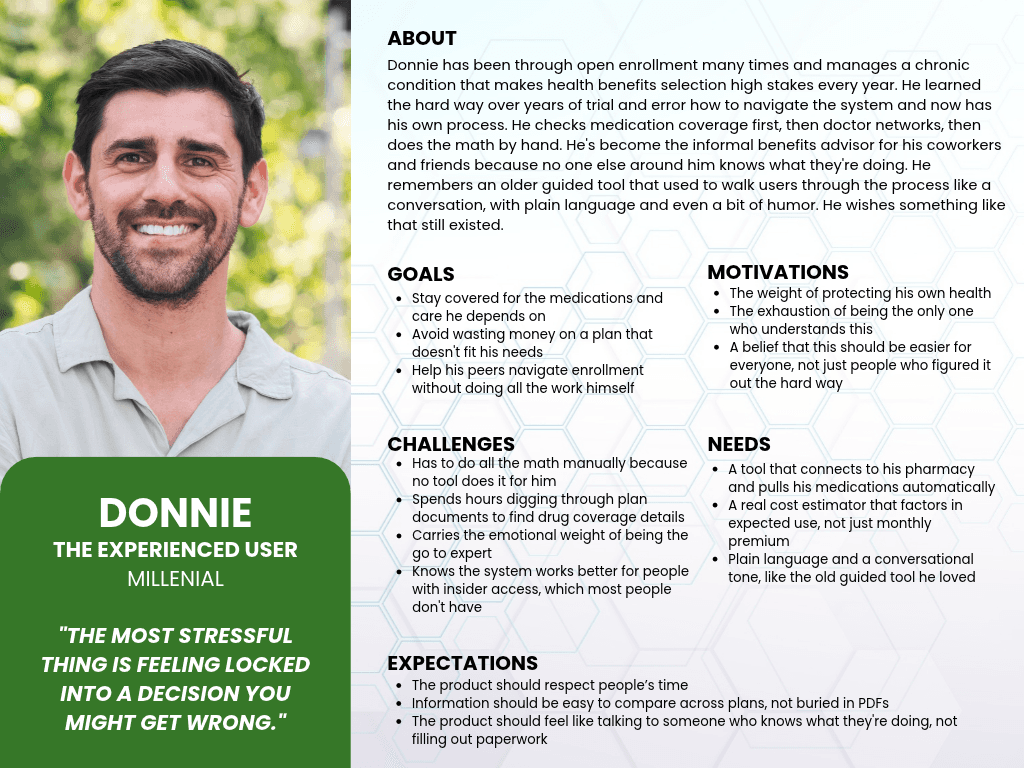
How Might We…
Ideation
I designed Day One mobile first, since millennials and Gen Z do most things on their phones. Three ideas guided every screen:
✓
Each screen asks one question
✓
Definitions appear only when someone taps a word
✓
The tone sounds like a helpful friend, not a form
I sorted my feature ideas into 4 groups based on my research:
•
Must-Have: Simple definitions, a real cost estimate, warnings about default settings, and a guided flow.
•
Nice to Have: A hidden benefits spotlight, side-by-side plan comparison, and a recap card.
•
Surprising and Delightful: A returning user mode and a life event detector.
•
Can Come Later: Partner coordination and a pharmacy connection.
I organized every screen into a sitemap before deciding how people would move through them. Term definitions open as pop-ups on every step, so I placed them outside the main flow.

First-timers walk through every step. Returning users can choose a quick update instead. Both paths check default settings before submitting.

I sketched each step in low-fidelity wireframes before adding any visual design.

Design
First-timers needed help at almost every step. Experienced enrollees wanted to move quickly. Each feature helps without holding anyone back:
•
Tap to Define: The prototype defines 18 terms, from premium to qualifying life event. Experienced enrollees can skip right past them.
•
Recommend, Then Let Them Choose: Day One suggests one plan and explains why. All 3 plans are still there to compare side by side.
•
Defaults in One Place: Settings that add a charge appear on one review screen before submitting.
•
Benefits at the Right Moment: Benefits people often miss show up while they're looking at a plan, not after they enroll.

•
Matching Their Look: I used Fidelity's existing brand style so Day One blends in with the rest of the site.
•
A Friendly Voice: People turned to friends for help, so Day One talks like one. It uses everyday words and reminds people that nothing is final until they submit.

Testing & Iterations
I tested Day One twice with 5 people each, mixing first-time and experienced enrollees. Round 1 used mid-fidelity wireframes and round 2 used a high-fidelity prototype. Each person started enrollment, looked up a term, compared plans, and submitted.
•
Feedback: Round 1 asked about a health savings account (HSA) before people picked a plan. HSAs only come with certain plans, so they couldn't answer yet.
•
Final Iteration: The question now comes after they choose a plan.
Earlier Version

Final Version

•
Feedback: Testers saw yearly costs like $6,500 and worried before they understood them. Several wanted to see the paycheck amount first.
•
Final Iteration: Cost screens now lead with the paycheck amount. The yearly estimate is one tap away.
Earlier Version

Final Version

•
Feedback: Several people asked how Day One knew they would hit their deductible. The screen never said, so they had no reason to trust it.
•
Final Iteration: Each reason now points back to their own answers, like "Based on the visits and prescriptions you expect, you'll probably meet your $750 deductible."
Earlier Version

Final Version

•
Feedback: People liked the hidden benefits, but few noticed them on their own. Most also didn't know an HSA could pay for things like sunscreen or chiropractic visits.
•
Final Iteration: Hidden benefits now have their own card. The HSA screen lists real examples instead of just a definition.
Earlier Version

Final Version

Results
In round 1, testers called Day One clean and easy to follow. One said that if it came from a major insurer, they'd assume it was a finished product. In round 2, all 5 testers made it through the full enrollment flow without getting stuck. Most of what I changed was about trust. People needed to understand the costs and believe the plan Day One suggested.
•
For First-Timers: Every suggestion comes with a reason based on their own answers.
•
For Experienced Enrollees: A quick update path lets them review their defaults and submit without redoing every step.
•
For Fidelity: A few testers said the HSA examples alone would make them sign up. That means more use of the accounts Fidelity offers.
Final Prototype

Final Thoughts
Day One taught me that clear information isn't enough on its own. It also has to feel personal. Users cared most about how a plan would affect their own paycheck and situation, not general plan details. It also taught me that good content can fail if it's hard to find. Every tester was excited about the hidden benefits once they saw them, but few found them on their own. Watching real people use the design is what showed me. It's why testing will always be a core part of my process.
Next Steps
•
Is My Doctor Covered?: Show whether someone's current doctor is in each plan's network. Testers brought this up without being asked.
•
Start With What Matters: Ask early what people care about, like eye care. Then show how an HSA could pay for those exact things.
•
Plan for Life Events: Add a path for moments like turning 26, starting a job mid-year, or expecting a baby.
•
Measure Understanding: Have people rate their confidence from 1 to 5 before and after using Day One.
What I'm Most Proud Of: Turning one of the most confusing decisions of the year into something people don't have to dread. Day One explains each step, shows costs in paycheck terms, and stays with people until they submit. It works for first-timers and experienced enrollees without slowing either one down. Whether it's someone's first time or their tenth, Day One meets them where they are.